
Accredible Configuration#
Accredible API Configurations#
Multiple Accredible API Configurations can be configured in the Open edX platform. Each API configuration stores the credentials that the Open edX Credentials service uses to sync groups and issue badges for an Accredible account.
To configure an Accredible account in Open edX Credentials, navigate to https://<your-credentials-host>/admin/badges/accredibleapiconfig/ and add a new configuration:
Set the name for the config.
Set the API key used to sync the Accredible account.
If errors occur, verify the credentials used for the API Config.
Groups#
Accredible groups are the provider-side equivalent of badge templates. After you create them in the Accredible dashboard, Open edX Credentials imports them through manual synchronization.
Note
Accredible does not support webhooks. You should run synchronization manually whenever you create, rename, or remove groups in the Accredible dashboard.
Synchronization#
Synchronization imports current groups from your Accredible account into Open edX Credentials so you can configure requirements, penalties, and activation state locally. Run it after you create, rename, or remove groups in the Accredible dashboard, and before you start configuring those groups in Open edX Credentials.
Navigate to
https://<your-credentials-host>/admin/badges/accredibleapiconfig/and check the checkbox for the Accredible API configuration you want to synchronize.Run the
Sync groupsaction.
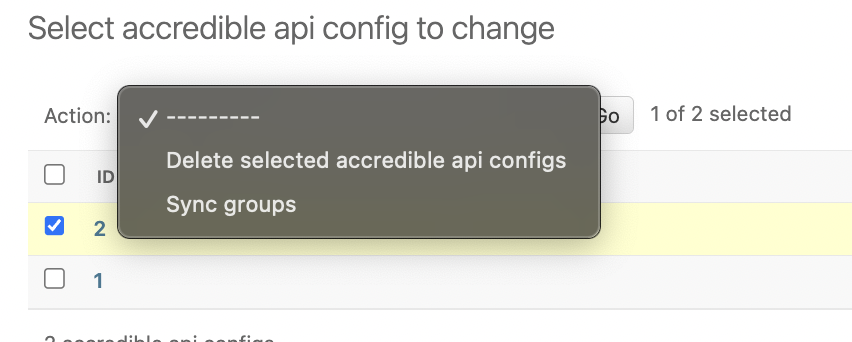
On success, the system updates the list of Accredible groups from the provider and creates new group records in Open edX Credentials as inactive (disabled).
Warning
Synchronization removes local group records that are no longer present on the Accredible side. This cascading deletion also removes associated requirements and data rules. Back up your configuration before syncing if you have made local changes.
Configure requirements (see Badge Requirements) and activate the group (see Activation and Deactivation) before it takes effect.
See also
- How Do I Find My Integration API Key?
Finding your Accredible API key for integration setup.