
Implementation Details#
This section covers internal details that may help with debugging, customization, or deeper understanding of the feature.
Events flow#
The following diagram illustrates the end-to-end issuance sequence.
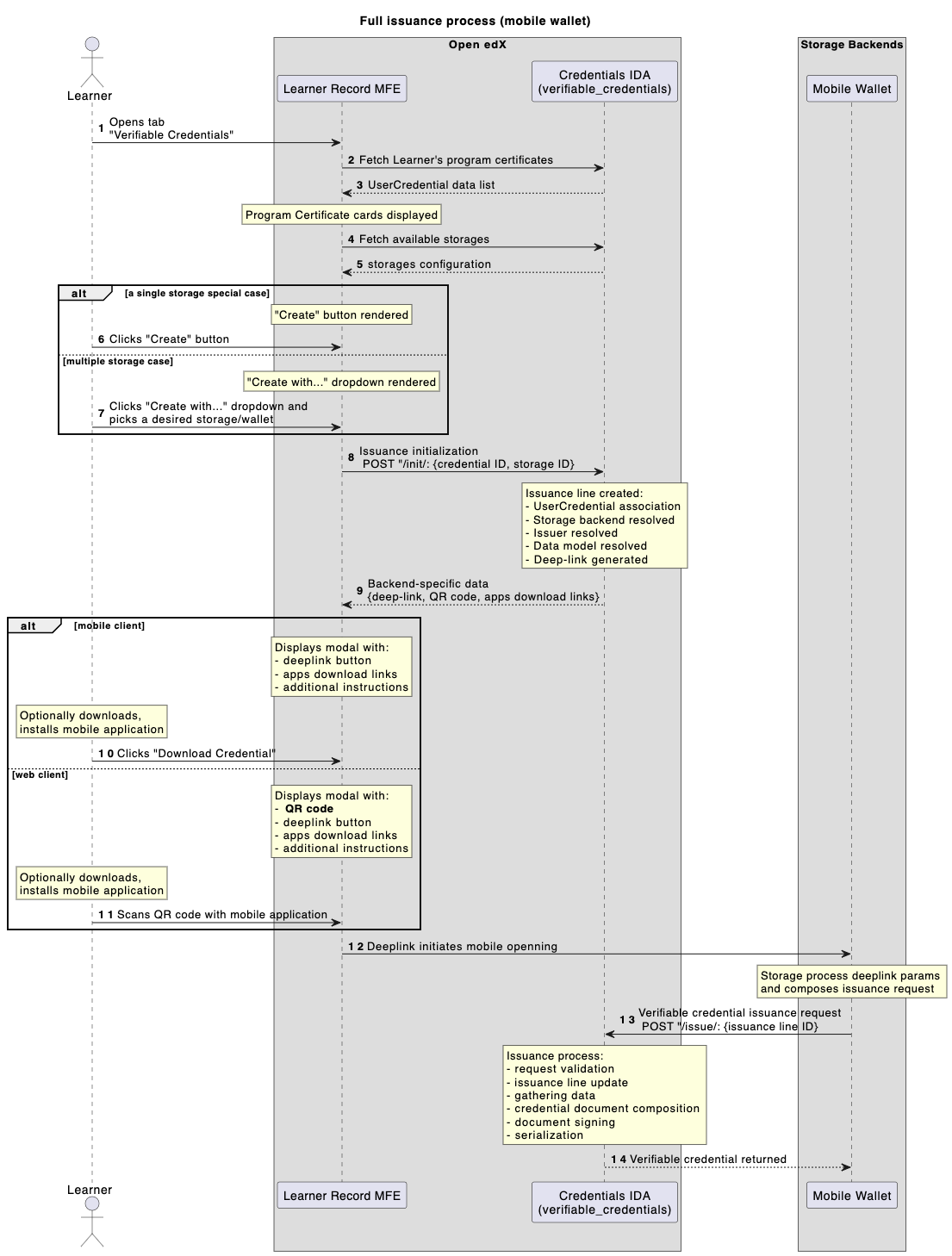
1 - Learner navigates to the Learner Record MFE, enters the Verifiable Credentials page.
2,3 - Frontend fetches all Learner’s credentials (program certificates).
4,5 - Frontend fetches configured storages list.
Learner chooses their credential (program certificate) to issue verifiable credential for.
6,7 - Learner initiates an issuance (standard case: single storage, experimental case: many storages).
8 - Issuance Line is created with given context (storage + program certificate).
9 - all pre-requisites are evaluated and deep-link/QR code generated.
Learner sees a modal dialog with deep-link/QR code to proceed with a mobile wallet app.
10,11 - Learner interacts with a dialog data (clicks/scans).
12 - Learner navigates to a mobile wallet app.
13 - mobile wallet app requests verifiable credential from an issuance API endpoint (on behalf of a Learner).
verifiable_credentials application processes Issuance Line data (collects required data, composes it into a desired shape, evaluates status list data, adds signature).
14 - well-formed verifiable credential returned to a mobile wallet app.
Mobile app verifies given verifiable credential (validates structure, signature, status info).
Credential signing#
All credentials are signed using the Ed25519Signature2020 proof suite exclusively.
VP authentication#
The IssueCredentialView accepts dual authentication: standard JWT/Session auth or a Verifiable Presentation
with proofPurpose: "authentication" and a challenge matching the IssuanceLine.uuid. The VP signature is
verified via didkit.
Signal-based status sync#
When a UserCredential status changes (e.g. revocation), all related IssuanceLine records are automatically
updated via a Django post_save signal. This ensures verifiable credentials reflect the current status of the
underlying Open edX achievement. In the case of revocation, the updated status is reflected in the issuer’s
Status List, allowing relying parties to detect revoked credentials during
verification.
Synchronous didkit operations#
All didkit cryptographic operations are async functions wrapped with async_to_sync. Each issuance blocks a
Django worker thread during signing. Consider this when sizing your deployment for high-volume issuance.
Technology choices#
openedx-didkit#
The cryptographic core is openedx-didkit, a fork of the original DidKit library by SpruceID with added Verifiable Credentials v2 support. It is Rust-based and integrated into Python via PyO3 bindings.
Status List 2021#
Revocation tracking uses the Status List 2021 specification - a simple bitstring where each issued credential occupies one bit position. This approach was chosen over blockchain-based solutions for its simplicity and because the status list is served as a standard API endpoint from the Credentials service (see Status List API).
OpenBadges v3.0#
The default data model is Open Badges v3.0, a specification designed specifically for educational achievements. It aligns with both VC Data Model v1.1 and v2.0, making credentials interoperable with the broader verifiable credentials ecosystem while retaining education-specific semantics (achievements, criteria, evidence).